We recently overhauled our speech-to-text (STT) pipeline, and the numbers speak for themselves: 87% reduction in monthly model costs, 35% faster processing, and dramatically cleaner transcripts. Here’s the full story of how we got there.
What Is Speech-to-Text at Meltwater, and Why Does It Matter?
At Meltwater, we ingest and analyze enormous volumes of media content every day. A significant and growing share of that content is video from YouTube, Instagram Reels, TikTok, and X (formerly Twitter). For our customers to be able to search, monitor, and analyze what’s being said in those videos, we need to convert the audio track extracted from the videos into text.
That’s where our speech-to-text system comes in. It transcribes the audio track from video content and makes those transcripts available across Meltwater products like Monitor, searchable and analyzable just like any article or social media post. In Q1 2026 alone, we processed around 3 million videos per month, or about 4,200 per hour.
The screenshot below shows how transcribed audio content surfaces in Meltwater’s Monitor UI. You can see audio transcripts appearing inline alongside regular social content, with the full spoken text available for analysis.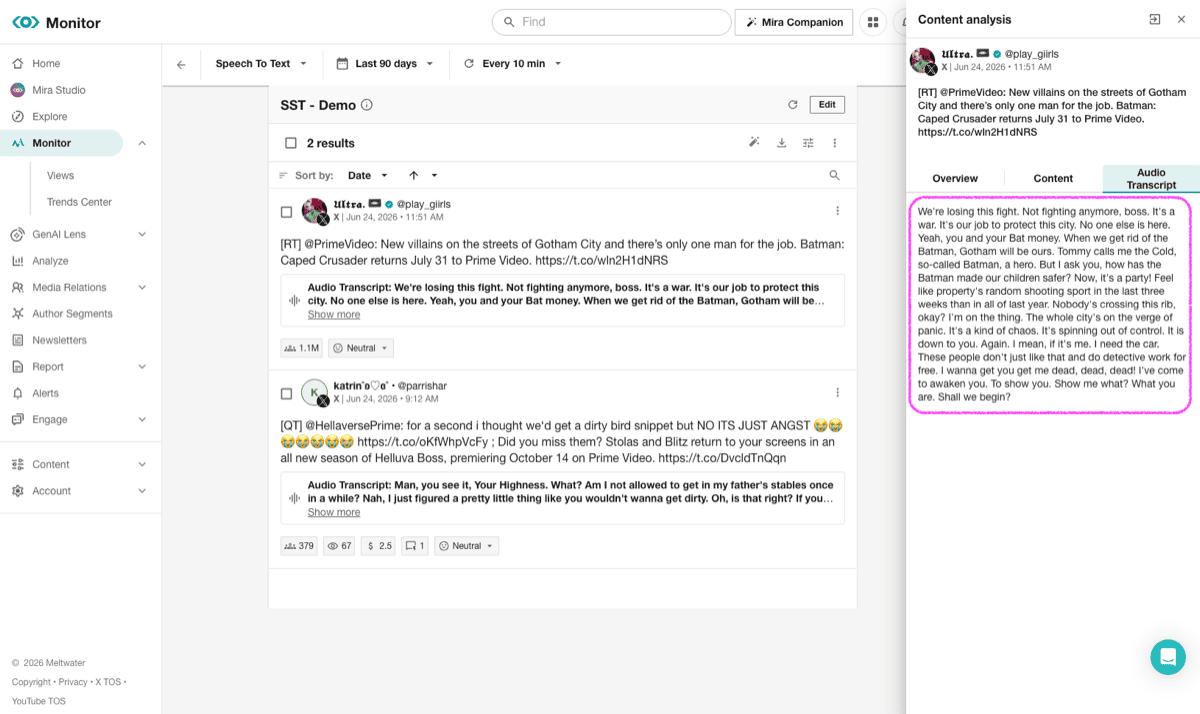
It’s a powerful capability, but it came with a cost problem we needed to solve.
The Problem: Noise, Music, Hallucinations
The core challenge with transcribing social video content is that most of it isn’t just someone talking. Music plays in the background. Creators lip-sync to songs. Rappers rap. Influencers post content set entirely to music with no speech at all.
Our speech-to-text (STT) model can’t reliably distinguish spoken words from sung lyrics or background music. This resulted in garbled, hallucinated, or outright wrong transcripts that had to be cleaned up after the fact. This is what the old pipeline looked like: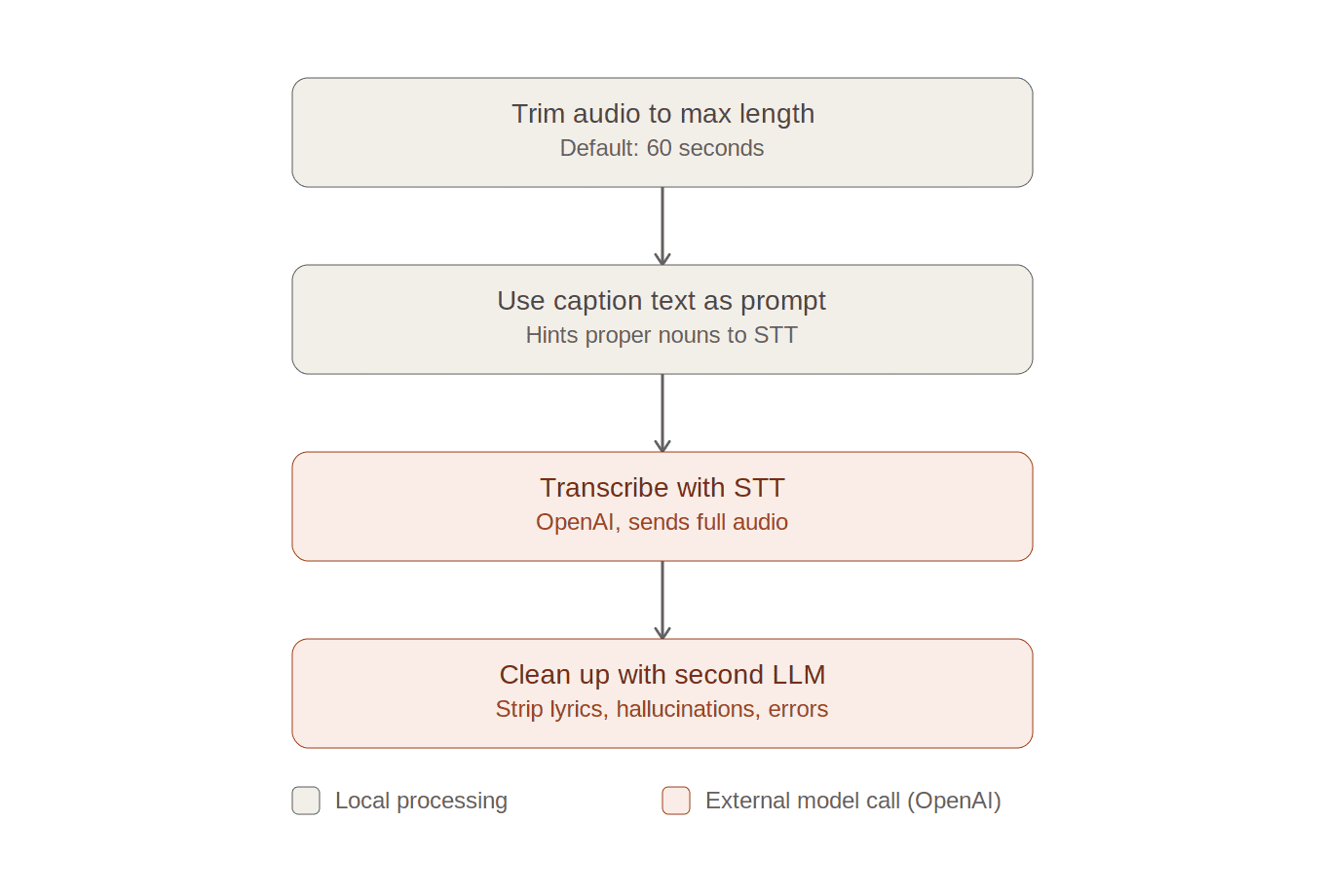
We used the texts accompanying the videos in their posts (the “captions”) as prompts to the STT model to hint the spellings of special named entities possibly mentioned in the audio.
The last step was in place to clean up the lyrics, hallucinations, noise etc. in the transcript. We used a prompt with a second LLM to detect and clean up such noise in the transcripts. However, this step was expensive, slow, and a symptom of a deeper issue: we were sending the STT model audio it was never going to handle well. The cleanup LLM was an interim solution; we needed a smarter filter upstream.
The Solution: Speech Activity Detection
The key idea behind the new pipeline is simple but powerful: only send actual speech to the transcription model. If a video is all music with no talking, don’t transcribe it at all. If it has a mix of speech and music, extract just the speech segments and stitch them together before transcription.
To do this, we introduced a Speech Activity Detection (SAD) step, a dedicated model that classifies audio frames as speech, noise, or music, before any transcription happens. Only parts of the audio that contain speech are stitched together and sent for transcription. For even further cost savings, we’ve split the STT model calls, adding a new additional provider for supported languages (Grok) that’s 44% cheaper than the previously used OpenAI STT model.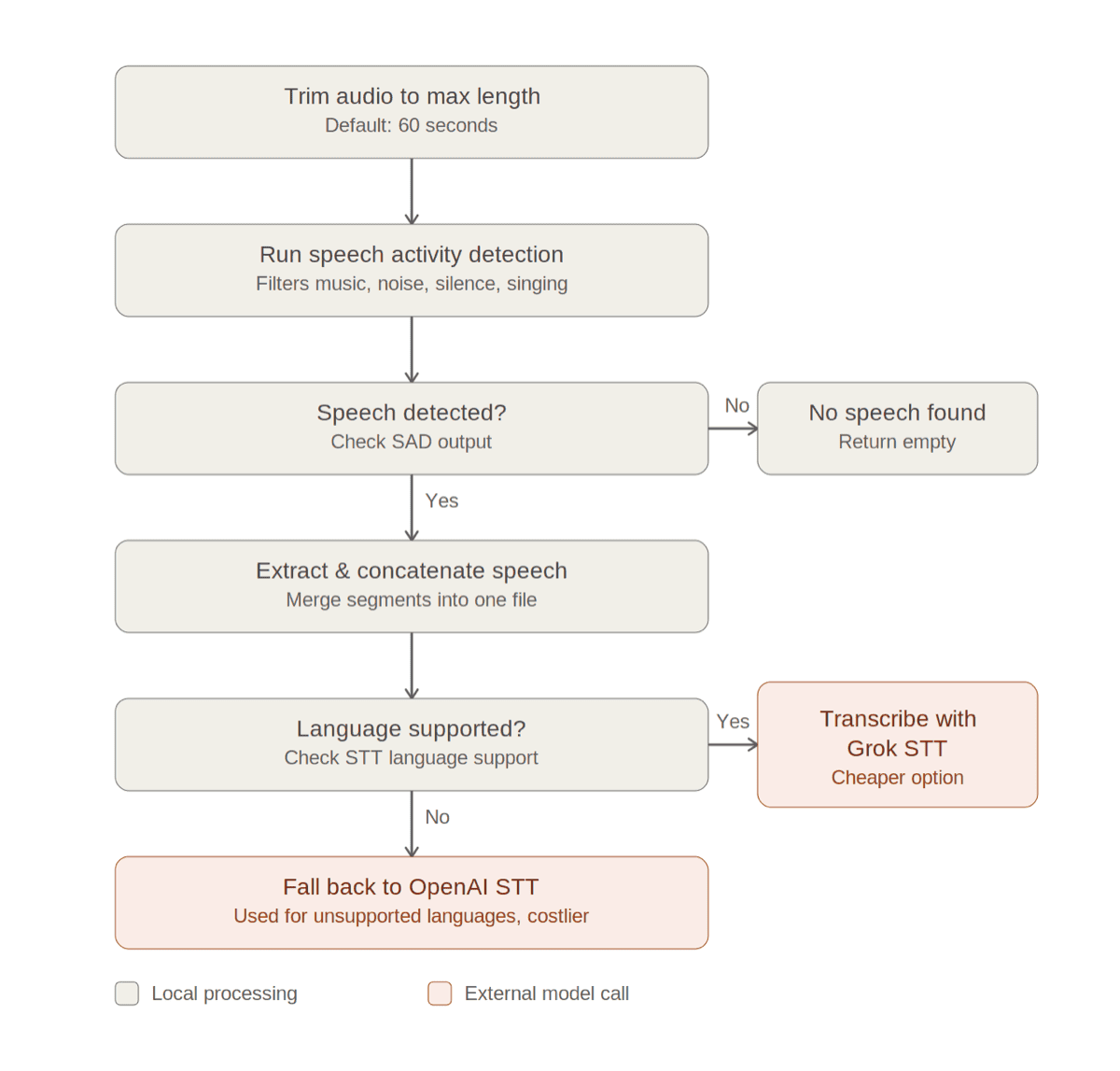
Two important implementation details in the speech activity detection step make the segmentation more robust in practice. Each detected speech segment is padded by 0.5 seconds on each side (clamped at zero on the left) to avoid abrupt cutoffs that would confuse the transcription model. Additionally, adjacent segments with a gap of less than 0.5 seconds are merged into one, so a speaker pausing for a breath doesn’t get split into two separate clips.
The downstream benefit: the post-processing LLM is completely gone. With clean, speech-only audio going in, the transcription output is clean enough without any cleanup pass. And last but not least, since we only send fractions of the original audio track for transcription, we save a lot of costs.
Finding the Best SAD Model
We evaluated three open-source speech activity detection candidates on a carefully curated benchmark designed to reflect the edge cases common in social media audio: music, speech-over-music, music-with-vocals, music-without-vocals, and mixed content:
- inaSpeechSegmenter: CNN-based audio segmentation toolkit with two variants: a 2-class speech/noise model (sn) and a 3-class speech/music/noise (smn) model.
- SileroVAD: classic voice activity detection model, tags speech sections in the audio.
- YAMNet: deep neural network trained to detect hundreds of audio classes on audio frames (~0.5s audio segments).
We tested these against a labeled set of real Meltwater content videos drawn from YouTube, Instagram, and TikTok. The videos spanned five content types: pure speech, speech over music, music with vocals, music without vocals and mixed (segments with and without speech both present). For two videos containing both speech and non-speech sections, we manually annotated ground-truth speech segment timestamps.
We evaluated on two tasks: (1) speech classification: does the video contain speech at all?, and (2) segmentation accuracy: where are the speech sections inside the two manually annotated videos?
We’ve used the standard classification evaluation metrics: precision tells us how many examples the model got right, recall is the number of correctly labelled examples from all the ones in the test set, while F1-score is the combination (harmonic mean) of the two.
Task 1: Has Speech / No Speech Classification
| System | Precision | Recall | F1 |
|---|---|---|---|
| InaSegmenter-smn-batch64 | 0.95 | 0.955 | 0.950 |
| InaSegmenter-sm-batch64 | 0.909 | 0.909 | 0.900 |
| Silero VAD | 0.846 | 0.818 | 0.798 |
| YAMNet | 0.95 | 0.955 | 0.950 |
| Baseline (old pipeline, no filter) | 0.737 | 0.545 | 0.405 |
The baseline, our old pipeline with no speech filter, scored an F1 of just 0.405 on this task, highlighting just how poorly it handled non-speech content. InaSegmenter (3-class SMN variant) and YAMNet both tied at the top with an F1 of 0.950.
Task 2: Segmentation Accuracy
For the segmentation evaluation, we looked at detection accuracy, precision, recall, and an F-score combining precision and recall across the two test videos with mixed segments (one YouTube, one TikTok).
| System | Detection Precision | Detection Recall | Detection F1 |
|---|---|---|---|
| InaSegmenter-smn-batch64 | 0.999 | 0.946 | 0.970 |
| InaSegmenter-sm-batch64 | 0.702 | 0.992 | 0.785 |
| Silero VAD | 0.999 | 0.940 | 0.968 |
| YAMNet | 0.788 | 0.982 | 0.830 |
The segmentation charts below visualize how each model performed against the ground truth (GT) segmentation on the two test videos. Blue indicates speech segments, red indicates non-speech.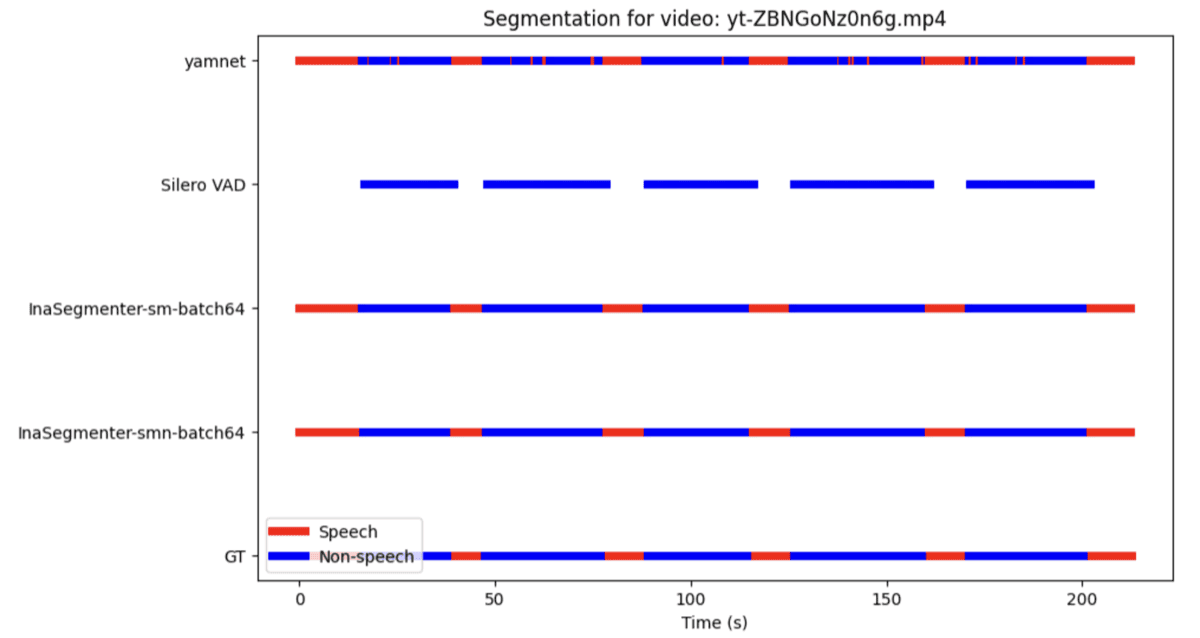
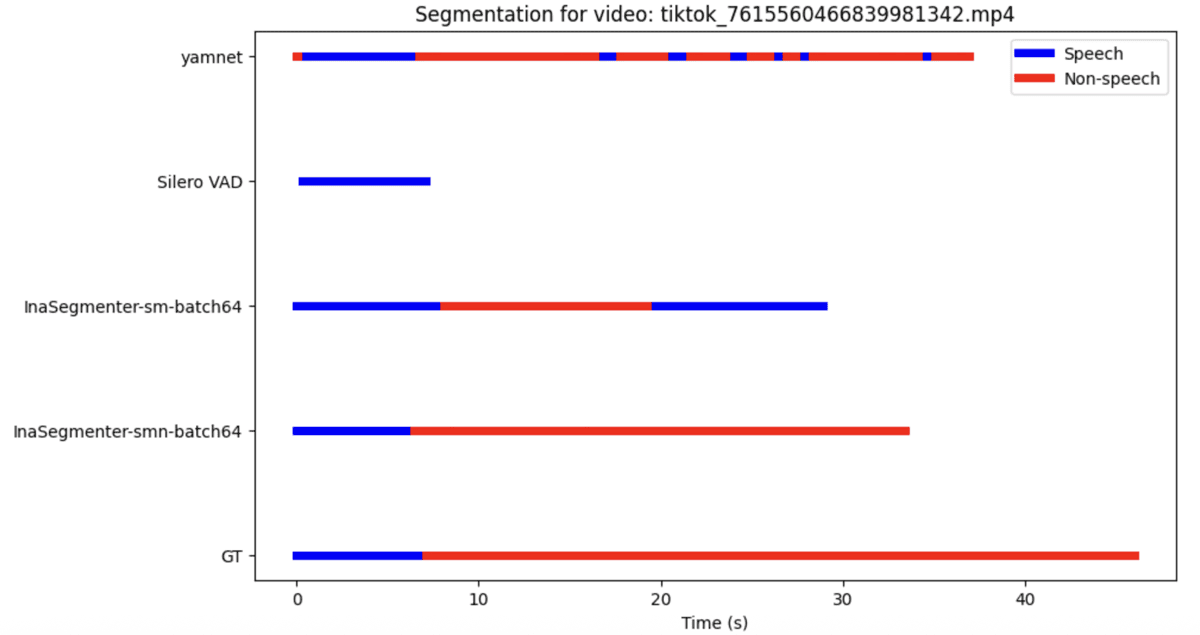
In the YouTube video, InaSegmenter-smn tracks the ground truth closely across the full ~200-second clip, while Silero VAD misses large chunks of speech in the middle sections. In the TikTok video, which has a more challenging mix, InaSegmenter-smn again aligns most faithfully with the ground truth, while YAMNet over-predicts speech significantly.
Conclusion: InaSegmenter with the 3-class model (smn variant, batch size 64) emerged as the best-performing model across both tasks. Its combination of near-perfect performance on both tasks (binary classification F1=.95, segmentation F1=.945) made it the clear choice for production deployment.
Going Further: A Dual-Provider STT Strategy
With the SAD pipeline delivering clean, speech-only audio, the next opportunity for cost optimization is the cost of the transcription step itself.
Our current STT provider is gpt-4o-mini-transcribe via Azure OpenAI, billed at $0.18 per audio hour. We’ve now integrated xAI’s Grok as a second provider, which comes in at $0.10 per audio hour, a 44% reduction on the transcription call alone.
The catch: Grok supports 31 languages, compared to OpenAI’s 100+. That’s a meaningful gap for a platform like Meltwater that processes content from all over the world. So rather than switching completely, we built a language-based routing layer that picks the right provider for each piece of audio.
How the Routing Works
Every piece of video content we process comes with caption text, the written text of the post itself. We already use this for spelling hints to the STT model. Now we also use its detected language code to make a routing decision:
- If the caption language is supported by Grok → send the audio to Grok ($0.10/hr)
- If the caption language is not supported by Grok → fall back to Azure OpenAI ($0.18/hr)
This keeps costs low for the majority of content while ensuring full language coverage is never compromised. Norwegian, for instance, is a language Grok does not currently support, so content detected as Norwegian routes cleanly to OpenAI.
The Caveat: Caption Language is Not Always Audio Language
One edge case to be aware of: a post’s caption language isn’t always the same as its spoken audio language. For example, a Hindi video with an English caption is something we’ve encountered. In most cases this is harmless, since Grok auto-detects the audio language regardless of how it was routed. The rare problem is when the audio is in a language Grok doesn’t support: rather than erroring out, it fails silently and returns a nonsensical transcript (in testing, Norwegian speech was misidentified as Danish and produced junk output). This scenario is uncommon, but to stay on top of it, our service logs a warning whenever Grok’s detected audio language disagrees with the caption language used for routing, giving us clear visibility into any mismatch.
The Results: Big Wins Across the Board
With both improvements in production (the SAD filter and the dual-provider routing) we measured the cumulative impact across cost, speed, and quality. The results exceeded our expectations.
Audio Length
By stripping out non-speech audio before transcription, the average length of audio actually sent to the STT model dropped from 32 seconds to 14 seconds, a 55% reduction. Less audio in means less work for the model, less latency, and lower bills.
Cost Savings
| What changed | Savings |
|---|---|
| STT model costs (shorter audio via SAD) | -55% |
| Post-processing LLM eliminated | -54% of total previous monthly model costs |
| Dual-provider routing (Grok for supported languages) | additional -44% on transcription calls |
| Total monthly model cost reduction | -87% and counting |
The elimination of the post-processing LLM remains the single biggest driver. But the dual-provider strategy stacks additional savings on top: every audio file routed to Grok instead of OpenAI costs 44% less to transcribe, compounding across millions of videos per month. We estimate that at least 80% of all incoming videos are routed to Grok, which covers the most frequent languages.
One honest caveat on the infrastructure side: the SAD model runs locally and requires beefier Kubernetes pods (higher CPU and memory). That adds a small hardware cost. But it’s firmly a rounding error compared to the savings above.
Speed
Average end-to-end processing time per video went from around 5.5 seconds to 3.5 seconds, a 35% reduction in response time. For a system handling 4,200 videos per hour, that headroom is significant and gives us capacity to scale further without proportionally scaling costs.
Quality
Transcript quality improved markedly. With the SAD filter removing music and singing before transcription, the STT model receives cleaner input and produces cleaner output: no more lyric hallucinations, no more music-induced noise in transcripts. Customers searching for spoken content in Monitor get more relevant, accurate results.
Wrapping Up
Two major improvements, a smarter filter upstream and a cheaper provider downstream, together delivered an 87% reduction in monthly model costs and made our pipeline 1.57x as fast as the old one, with transcript quality better than ever.
Sometimes the best optimization isn’t doing the same thing more efficiently. It’s doing less of the thing that shouldn’t be happening at all, and being smart about who you ask to do the rest.