Migrating databases between cloud providers is rarely straightforward. Even when both environments run the same database engine, differences in infrastructure, networking, storage behavior, and operational tooling can introduce unexpected challenges.
At Meltwater, we recently migrated a 1TB PostgreSQL database from AWS to Azure Flexible PostgreSQL as part of a broader infrastructure consolidation effort. Our goal was to move the data safely while minimizing operational risk and downtime.
To perform the migration, we used pgcopydb, an open-source PostgreSQL migration tool that automates many of the complex steps required to copy schema, data, and indexes between PostgreSQL instances.
In this post we’ll cover:
- the migration approach we used
- trade-offs between migration strategies
- how we executed the migration in Kubernetes
- common pitfalls encountered during the process
Why pgcopydb?
PostgreSQL provides several migration approaches, including:
pg_dump/pg_restore- logical replication
- physical replication
- third-party migration tools
For this migration we chose pgcopydb because it provides a practical balance between automation and control.
Key capabilities include:
- automated schema and data copying
- parallelized table transfers
- support for table and schema filtering
- efficient index and constraint handling
- support for both offline and online migrations
Most importantly, pgcopydb allows migrations to be executed with a single repeatable command, making the process easier to test and automate.
Migration Architecture
The migration architecture was intentionally simple.
A short-lived Kubernetes pod executed the pgcopydb migration and connected directly to both the source and target databases.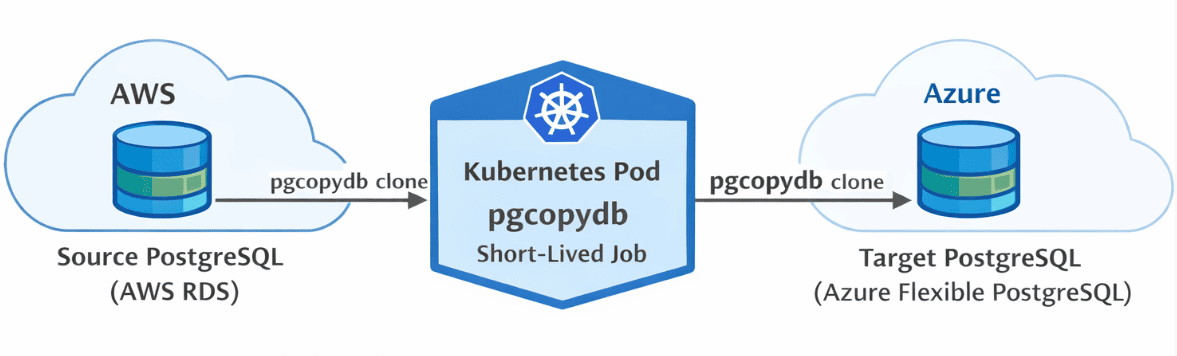
This design provided several operational advantages:
- reproducible execution
- secure secret management via Kubernetes
- centralized logging
- easy re-execution if failures occurred
Running migrations inside Kubernetes also allowed us to keep the process consistent with the rest of our infrastructure tooling.
Migration Timeline
Before executing the migration in production, we validated the process in staging and estimated the duration of each phase.
The migration followed five predictable stages.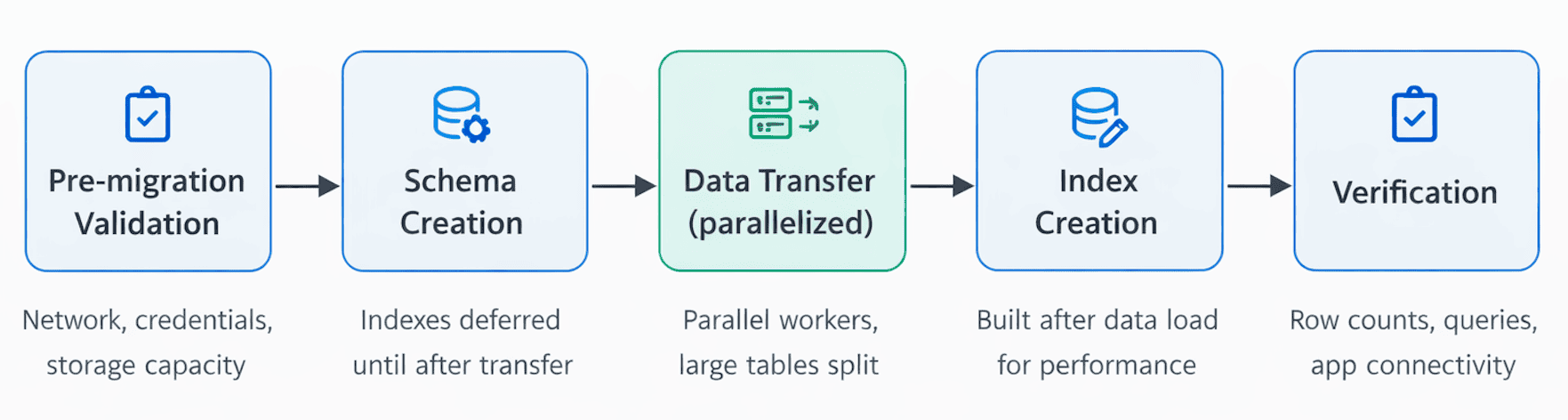
1. Pre-migration validation
Before copying any data we verified:
- network connectivity between environments
- database credentials and permissions
- available storage capacity on both systems
2. Schema creation
pgcopydb first created the schema in the target database.
Indexes and constraints were prepared but deferred until after the bulk data transfer to avoid performance overhead during copying.
3. Data transfer
Tables were copied in parallel using multiple workers (--table-jobs option).
Large tables were automatically split into smaller chunks, improving throughput and preventing individual tables from becoming bottlenecks.
4. Index creation
Once the data transfer completed, pgcopydb built indexes on the target database.
Creating indexes after data loading significantly improves migration performance.
5. Verification
Finally, we validated the migration by:
- comparing row counts
- executing representative application queries
- confirming application connectivity
Online vs Offline Migrations
One of the first decisions in any migration is whether to perform it online or offline.
The best approach depends on several factors:
- database size
- acceptable downtime
- frequency of data changes
- operational complexity tolerance
Offline Migration
An offline migration pauses writes to the source database during the migration.
Advantages:
- simpler operational model
- guaranteed data consistency
- fewer moving parts
Disadvantages:
- requires planned downtime
For smaller databases or environments with a maintenance window, offline migrations are often the simplest option.
Online Migration
An online migration keeps the source database operational while data is copied.
pgcopydb can replicate changes from the source database during the migration so the target remains nearly synchronized. Once replication catches up, a short cutover switches the application to the new database.
Advantages:
- minimal downtime
Disadvantages:
- increased operational complexity
- additional monitoring requirements
For this migration we chose a hybrid approach, prioritizing reliability and operational simplicity. We used a bulk snapshot copy and then had an internal process that migrated the delta data for each unit of data that was changed from one system to the other, as these were individually moved from one system to another. (We moved all the data related to the entity we were migrating that had changed since we took the snapshot.)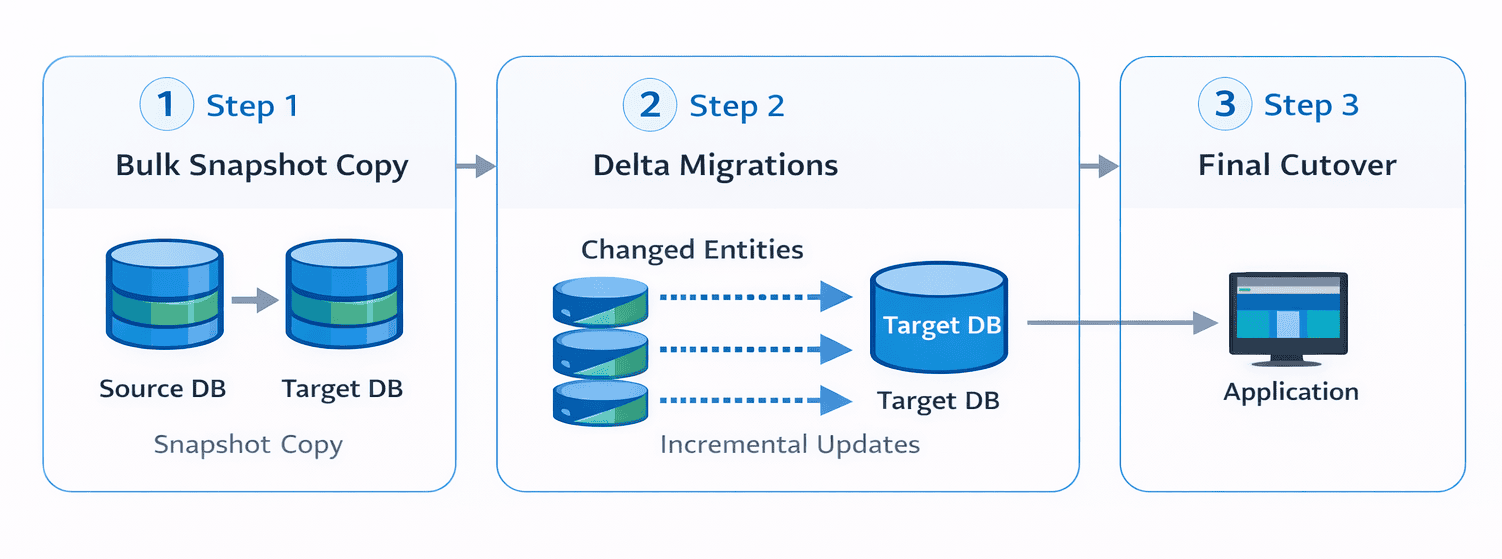
Migration Strategies
Determining what data to migrate is just as important as selecting the migration tool.
While copying an entire database may be the simplest option, selectively migrating datasets can reduce migration time and infrastructure costs.
Full Database Migration
When all data is required in the target environment, a full migration is often the simplest approach.
pgcopydb clone \
  --source "postgresql://sourceuser@source-host/database" \
  --target "postgresql://targetuser@target-host/database"
This copies both schema and data from the source database to the target.
Subset Migration
Large databases often contain archival or rarely accessed data. Migrating only active datasets can significantly reduce migration time.
pgcopydb clone \
  --source $SOURCE_DB \
  --target $TARGET_DB \
  --exclude-table public.audit_logs
This excludes the audit_logs table from the migration.
Filtering can also be defined in configuration files for larger migrations.
Prioritizing Critical Data
Not all datasets are equally important.
Operational tables such as customers, orders, or billing may need to be available immediately after migration, while analytics tables can be migrated later.
pgcopydb clone \
  --source "$SOURCE_DB" \
  --target "$TARGET_DB" \
  --table public.customers \
  --table public.orders
This staged approach allows critical application functionality to resume sooner.
Cleaning Up Before Migration
Migrations provide an opportunity to remove unnecessary data.
Cleaning up datasets before migration can:
- reduce migration time
- lower storage costs
- improve database performance
Common cleanup targets include:
- obsolete tables
- old log data
- duplicate records
- unused indexes
Considering Table Dependencies
When migrating subsets of data, it is important to account for relationships between tables.
Foreign key constraints, triggers, and application queries may depend on related datasets being migrated together. Ignoring these dependencies can lead to missing data or broken queries in the target environment.
Running pgcopydb in Kubernetes
To simplify execution we ran the migration as a short-lived Kubernetes pod.
This approach allowed us to:
- store database credentials securely using Kubernetes secrets
- manage configuration through ConfigMaps
- inspect logs if the migration failed
The pod executes the pgcopydb migration command once and exits when the migration completes.
This makes the process easy to repeat if adjustments are required.
Here is an example of Kubernetes manifests to deploy an offline migration.
apiVersion: v1
kind: Pod
metadata:
  name: pgcopydb
  labels:
    app: pgcopydb
spec:
  containers:
  - image: ghcr.io/dimitri/pgcopydb:latest
    command:
    - "pgcopydb"
    args:
    - "clone"
    - "--no-owner"
    - --drop-if-exists
    - --plugin
    - wal2json
    - --no-acl
    - --skip-extensions
    - --filters
    - /etc/config/pgcopydb-filter-file.txt
    - --split-tables-larger-than
    - 20GB
    imagePullPolicy: IfNotPresent
    name: pgcopydb
    envFrom:
    - secretRef:
        name: pgcopydb-secrets
    volumeMounts:
    - name: config-volume
      mountPath: /etc/config
---
apiVersion: v1
kind: ConfigMap
metadata:
  name: pgcopydb-filter-file
data:
  # https://pgcopydb.readthedocs.io/en/latest/ref/pgcopydb_config.html#filtering
  pgcopydb-filter-file.txt: |
    [exclude-schema]
    partman
    [exclude-table-data]
    public.seldom_used_table
    public.some_other_random_table
---
apiVersion: v1
kind: Secret
metadata:
  name: pgcopydb-secrets
type: Opaque
stringData:
  PGCOPYDB_SOURCE_PGURI: "postgres://<USER>:<PASSWORD>@<SOURCE_HOST>/<DATABASE>"
  PGCOPYDB_TARGET_PGURI: "postgres://<USER>:<PASSWORD>@<TARGET_HOST>/<DATABASE>"
Common Migration Pitfalls
Even with reliable tooling, several issues can cause migrations to fail or behave unexpectedly.
Storage Allocation on the Target
Many managed database services automatically expand storage when capacity is reached. However, storage expansion operations can take time.
During migration this can temporarily place the database in read-only mode, causing the migration to fail.
Pre-allocating storage before starting the migration helps avoid this issue.
Hashing Algorithms and Compliance
If migrating to a FIPS-compliant environment, ensure that hashing algorithms used in your database meet compliance requirements.
For example, MD5 is not considered FIPS compliant and may be restricted in certain environments.
For more information:
We had to change the use of a MD5 hash to a SHA hash on the source side to be compliant. (This is an Azure requirement and not a pgcopydb issue.)
Snapshot Storage Requirements
pgcopydb uses a consistent snapshot to ensure data integrity during migration.
On databases with high write activity, this snapshot can increase temporary storage usage on the source database.
Monitoring disk utilization during migration is important to avoid running out of space.
The Actual Migration
We moved a 1TB database in just under a day, and after addressing the pitfalls identified in the test runs the main migration completed without any issues at all.
- total dataset size: 1 TB
- largest table: 600 GB
- migration runtime: 23 hours
pgcopydb parallelizes data transfer across multiple workers, significantly improving performance compared to traditional dump-and-restore workflows.
Using the --split-tables-larger-than option helped distribute large tables across workers, preventing them from becoming migration bottlenecks.
Several practical lessons emerged from this migration.
- always test migrations in staging environments
- verify storage capacity on both source and target systems
- schedule downtime carefully for offline migrations
- review migration logs early when troubleshooting failures
Even relatively straightforward migrations can expose unexpected infrastructure behaviors.
Conclusion
pgcopydb proved to be a reliable and flexible tool for migrating PostgreSQL databases between cloud providers.
By executing the migration inside Kubernetes, we were able to run the process in a reproducible and controlled environment while maintaining full visibility into the operation.
Although every migration presents unique challenges, tools like pgcopydb significantly reduce the operational overhead involved in moving PostgreSQL workloads across environments.
For more details and advanced examples, see the official pgcopydb documentation.
This blog post was written by humans. AI was used to generate the illustrations above.