As an engineer on one of Meltwater’s enablement teams, I work on managing our users database and making that data available to other engineering teams.
Today we will be discussing event driven architectures, and how you can build a simple, yet powerful system in this architecture using MongoDB’s change streams. We will also touch on performance, and some meaningful changes that will be coming in the future. Let’s jump right in!
Events and Event Driven Architectures
What exactly is an event driven architecture? Let’s break this down to start from smaller building blocks and gradually building from there.
Use Case
In our application, a user can change their email address. When a user changes their email, we want to send a confirmation email to that user, as well as notify other teams that rely on the email address for automated communication.
Naive Approach: Polling
To address the above use case, our API could trigger the email notification when we receive the call to update the email address. Other teams could poll our API to detect differences in the email for the users they care about. Here is a simple diagram to exemplify this: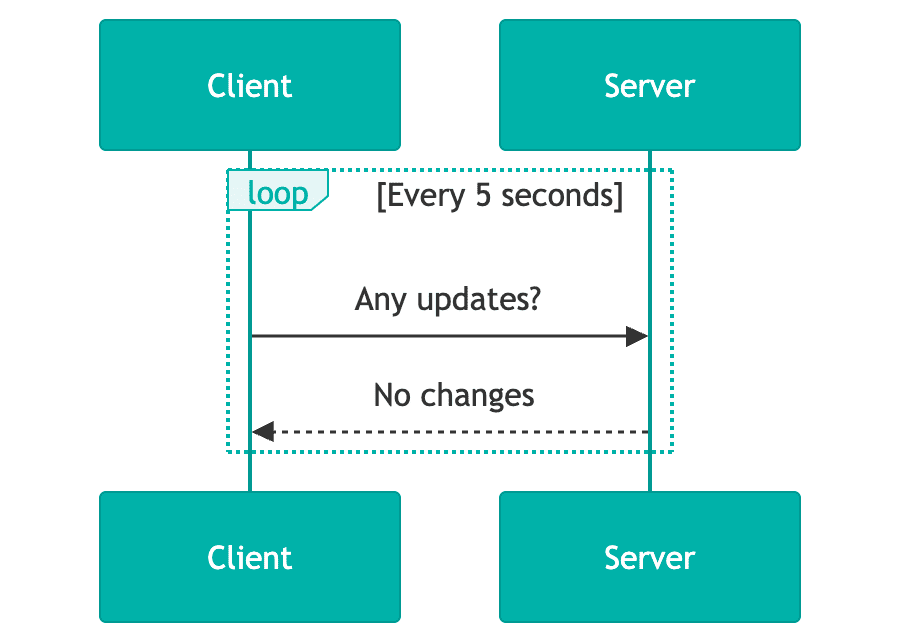
The API being responsible for triggering the email notification creates tight coupling between our service and an external vendor, which can cause latency for customers, as well as introduce non-business specific logic into application code (like retries, deadlettering).
Polling the API is known to be problematic, especially at scale. It creates a high volume on a single API which wastes resources, introduces latency, creates logic duplication across consumers, and can lead to data drift. These problems are compounded when the data itself is relatively static.
An Event Driven Approach
Instead of polling, we can instead have systems “react” or “listen” to these changes in real time. A team who is interested in an email change for a user can subscribe to that change, and make any requisite updates they need to in order to properly handle the email change. More specifically, when a user’s email changes, we will send a “payload” to all subscribers of this event to notify them of the change.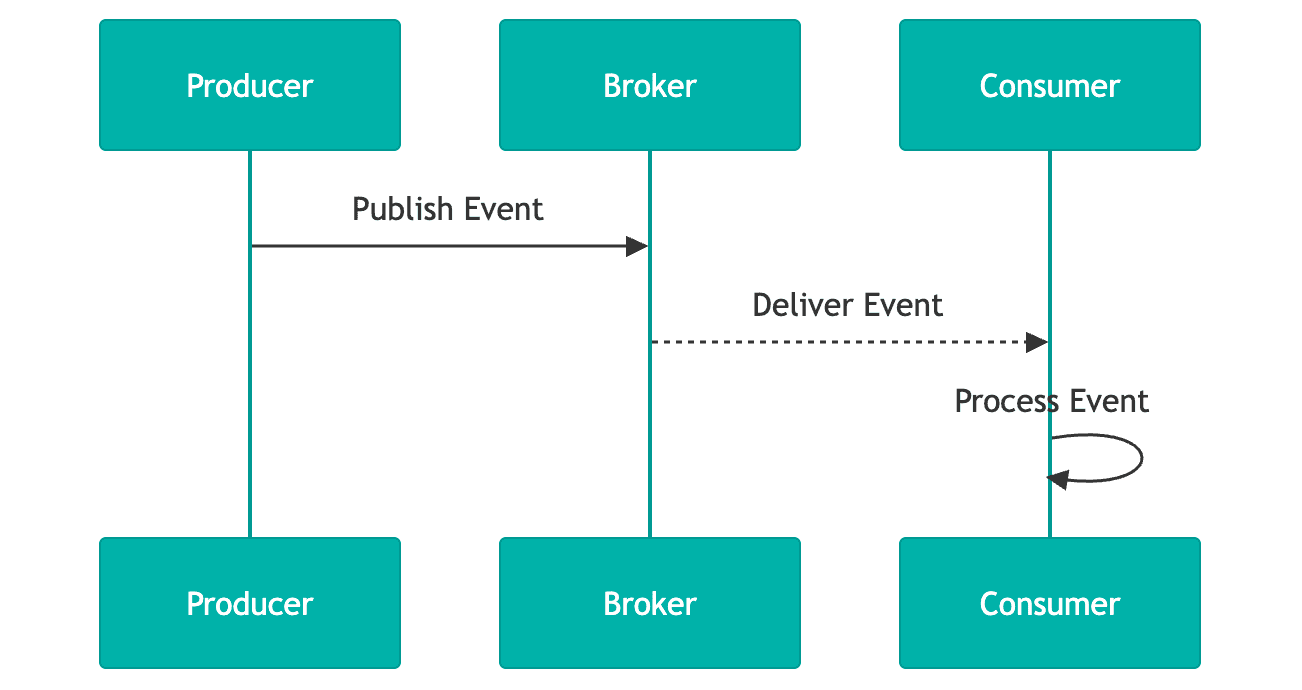
Transforming the polling approach to this event driven solution solves the problems with polling, and builds a more robust and scalable solution. By offloading any dependency on the originating API itself to an asynchronous background task (which can be handled independently of the change itself), we reduce coupling, latency, and address resource waste, high volume, and potentially stale data.
In this event driven pattern, an event is sent upon the completion of some change occurring within a system. That event is received by a set of subscribers who can take individual actions depending on their use case (for example, sending the email confirmation).
To note, there are other versions of an event driven pattern not outlined here (for example webhooks). They have their own value and should be investigated as well.
Terminology
An event is a well defined payload sent upon a change within your systems. The well defined payload can be any agreed upon structure that your system needs and allows. The event payload (the change) should include the data required for other subsystems to react or process it. Taking the user email change from above, here’s a sample payload:
{
  "source": "users-api",
  "deduplicationId": "c73b0718-9e76-4571-8112-390f2832dc03",
  "type": "email-changed",
  "payload": {
    "oldEmail": "old.email@meltwater.com",
    "newEmail": "new.email@meltwater.com"
  }
}
We include the source and the type, which allows other teams to ignore events they are not interested in. The deduplication ID is used for ensuring that we don’t send duplicate events. Lastly, we include the old and new email. This piece is a design choice. It’s not required to send difference-like events, you can also send snapshots.
More generally, producers send events to zero or more consumers. There are many ways to get events from producers to consumers. At Meltwater, we use the publish/subscribe architecture (or pub/sub for short). In this architecture, a consumer subscribes to a set of event types (i.e. email-changed) or all changes. The services and systems built using this architecture are considered to be event driven.
Sample Publish/Subscribe Architecture
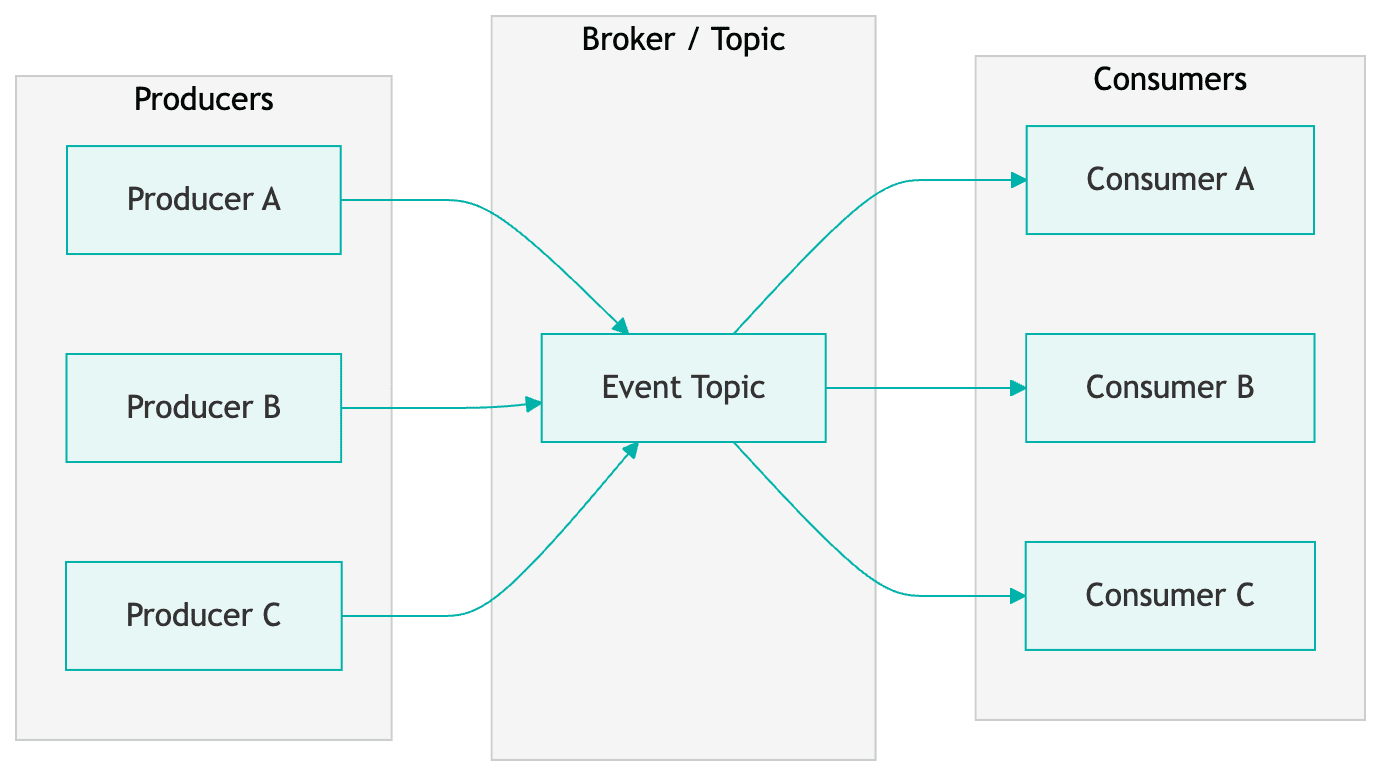
Here is a very simple example of a publish/subscribe architecture. We have a set of producers who send messages or events to a broker. That broker then allows consumers to subscribe to specific (or all) events it accepts. The consumers will then receive payloads that match their subscription and can execute any code they like.
For our implementation here at Meltwater, we use AWS’s Simple Notification and Simple Queue services (SNS/SQS respectively). Producers send an API call to our pub/sub service, which places a message on the SNS topic (the broker).
Consumers then register subscriptions for messages they care about and create SQS queues using those subscription filters. Any time a message in the topic or broker matches their subscription, it will be placed in their SQS queue for processing. Many of our consumers typically use serverless components (for example, AWS lambdas) as the volume isn’t always big enough to justify a continuously running service. The serverless instance will grab messages off the queue and process them. Below is an example of this flow.
It is good practice to also configure deadletter queues (DLQ) with your SQS queues to handle error cases, however we won’t be diving into that here. I encourage you to read into those on your own.
Leveraging MongoDB Change Streams
Now that we have an understanding of event based architectures, let’s see how we can use MongoDB to power this.
Operation Log
In MongoDB, all transactions (insert, update, replace, delete) go into an operation log, oplog for short. An oplog is like a persisted event system, it’s a series of events that happened on the database you can access in real time.
Change Streams
A change stream is the stream of events happening in the oplog. We can subscribe to those changes and react to them! MongoDB will publish any changes that happen in your database to this stream. Change streams are built on top of MongoDB aggregation, allowing us to write normal database queries as a way of interacting with the stream which is really powerful. You can learn more about change streams here.
Limitations
There are some important limitations of change streams worthwhile mentioning. You can only have a single change stream per collection. If you want multiple streams, you will need to have two different collections. You can achieve this by merging documents (rows) into another collection inside your pipeline. There is a way to create multiple subscriptions on the single stream.
For the best stream performance, it is recommended to use at least MongoDB version 5.0 or above, and the newest compatible database driver version. You should also investigate the tuning options, specifically batch size and oplog size, as they can have an impact on your performance and ability to recover from any issues with your subscription or MongoDB.
We will discuss handling some of these limitations later.
Implementation
We now have the basic knowledge of events, event driven systems, and change streams. So how does this work in practice? Well, it’s really quite simple. You will need to spin up some application code which is long running (whether Kubernetes, Elastic Compute Cloud for example). That code will:
- Make a connection to the database
- Get the specific collection you would like to listen to changes to, and then
- Create the change stream subscription
We will outline sample code below.
Producer
class ChangeStreamConnection {
  async _connect() {
    client = await MongoClient.connect(mongoUri, mongoOptions);
    database = await _connectToDatabase(databaseName);
    collection = await _getCollection(database, collectionName);
    return _connectWatcher();
  }

  _connectToDatabase(databaseName) {
    return client.db(databaseName);
  }

  async _getCollection(database, collectionName) {
    return await database.collection(collectionName, { strict: true });
  }
}
We create the Mongo client, connect to the database, grab the collection, and then connect the watcher. The watcher is what we call our application which watches the change stream. It’s simply where we create our subscription.
Subscription
async _connectWatcher() {
  const operationTypes = {
    $match: {
      operationType: { $in: ['insert', 'update', 'replace', 'delete'] }
    }
  };

  _changeStreamCursor = collection.watch(
    [operationTypes],
    { fullDocument: 'updateLookup', batchSize }
  );
}
Here we create our actual subscription to the change stream. We call a watch method on the collection itself (we got this in the previous code snippet), which takes an array of aggregation pipeline stages, and then a set of options.
The aggregation pipeline contains the definition of operationTypes, which specifies the types of operations we want from our oplog in the stream. For simplicity’s sake, we are only keeping one stage in the pipeline. But, we could add any other stages to that array, for say ignoring specific updates, or doing further processing like projection before handling the event in application code.
For brevity’s sake, the options here are small (please consult the MongoDB docs to learn more). Here we use:
- batchSize - This specifies how many events we want from the change stream inside a single batch.
- fullDocument - Set to
updateLookup. This means that we will get the full document for update events instead of just the changed fields. This allows us to publish the new version of the user in entirety.
Listener
The last piece of code you need is handling the change event which is triggered by this subscription. That code is pretty simple:
this._changeStreamCursor.on('change', (event) => {
  this._relayEvent(event);
});
In our case we call _relayEvent, but it can be any function you define. Depending on your use case, it could just be doing the publish right from here. We perform cleaning and transformation before sending anything downstream, which happens within this call stack.
Putting it All Together
By combining the Producer, Subscription, and Listener sections together, you will have all the code for processing realtime change stream events that can then be sent to a message broker.
Most of this code is generic, but I would like to highlight how this maps to our example. Going back to our use case above, the Subscription allows us to process all user update events in the change stream. When those events are placed in the stream, the Listener is triggered, allowing us to build the well defined payload we made earlier and send it to the SNS topic.
Performance
Scalability
Without much tuning we were averaging about ~25 user events/sec with no alerts. Our bottlenecks stem from JSON parsing and the cleaning we do before publishing a message to the SNS topic.
This can be offloaded to aggregation pipeline steps in the future, running natively in MongoDB and benefiting from their optimizations, all before we reach our application. From here tuning the watch function options (like increasing the batch size) can improve performance.
Considerations
Horizontal Scaling
There can only be one change stream per collection. If you want to horizontally scale, you’ll want to do one of two things:
- Make your subscriptions specific (i.e. only updates) - Create multiple subscriptions on the same stream (and multiple instances of your application)
- Merge changes into other collections to create multiple change streams - Be aware you will need to manage this yourself, so keep in mind the complexity
Application Logic
I recommend minimizing any logic outside of the stream itself. Use aggregation steps as much as possible, keeping your application logic small, and leverage the more performant aggregation pipeline.
If you need to do processing in the application layer, architect your solution to do that outside of the stream handling itself. Place events from the stream into a queue for a separate process to do longer running operations. This keeps your stream as close to real time as possible, without sacrificing your underlying logic. You can even leverage the sample architecture above.
Pausing
It is possible to pause a stream. Since this is a log of changes, if you pause at 5 out of 10 events, further events will continue to build up in the stream, but you can resume at 6 using timestamps.
This is powerful for keeping your application running with the stream, minimizing interruption, and allowing you to heal the process by catching up to the backlog of events (see the resumeAfter and startAfter watch function options).
Future Considerations
Our implementation of this architecture allowed us to fully replicate a MongoDB database running outside of Atlas with eventual consistency, as well as power all core user events with no downtime. This implementation can be improved in the future, by leveraging newer MongoDB features and products.
Stream Processors
Stream processors are a newer MongoDB product and are built on top of change streams. You can reuse your existing aggregation pipeline(s) defined above, but this runs directly on MongoDB instead of your application. This product enables you to create very complex multi step processors that can also publish to a growing list of event brokers directly.
Theoretically, you can replace this entire architecture (minus the publish/subscribe system), with something running natively on MongoDB Atlas. You will get the best of both worlds: native MongoDB code, running on the most optimized hardware.
Wrap Up
Thank you for taking the time to read this through! I hope you learned something valuable and want to try out MongoDB change streams. They are a very powerful tool that can help you build a reliable and performant system.
I would also like to thank MongoDB for allowing us to participate in their private preview program for stream processors, and allowing us to submit feedback.